



Top 15 best WoW Forever addons you need in 2026
Best WoW Forever addons for leveling, maps, bags, auctions, loot, and UI. See 15 working addons and how Forever versions work.

Key takeaways
- WoW Forever supports addons, but players should install versions specifically marked for Forever 1.60.1 rather than copying files from Classic Era or Retail.
- Questie, Leatrix Plus, Bagnon, Auctionator, and other popular addons already have Forever-compatible releases.
- Addons can be installed through CurseForge or manually in the
_forever_/Interface/AddOnsfolder. - Combat-related addons face restrictions under Forever’s modern API, but Blizzard provides built-in tools such as the Damage Meter and Cooldown Manager.
Table of Contents
Looking for the best WoW Forever addons? Forever supports addons, but its interface works differently from ordinary Classic WoW, meaning you should not simply copy your entire Classic Era addon folder and expect everything to function.
Fortunately, many popular addon developers already support the WoW Forever release client, including Questie, Leatrix, Bagnon, Auctionator, TomTom, and more.
Related posts



Here are 15 useful WoW Forever addons. By the way, the right addons can make your adventures across Azeroth much easier, and if you want to spend less time farming resources, you can buy WoW Forever gold to complement your streamlined leveling experience.
What are the best WoW Forever addons

Our criteria for the best WoW Forever addons are simple:
- The addon currently provides an official or maintained Forever-compatible build.
- It offers meaningful quality-of-life improvements without relying heavily on restricted combat information.
Forever uses the modern WoW addon API direction rather than simply inheriting the old Classic API. Blizzard also wants fewer combat addons to feel mandatory, with features such as a built-in damage meter reducing the need for some traditional addons.
Note
Each recommendation includes a link to its main CurseForge project page. When downloading, make sure to select the WoW Forever 1.60.1 version rather than a Retail or Classic release.
Questie
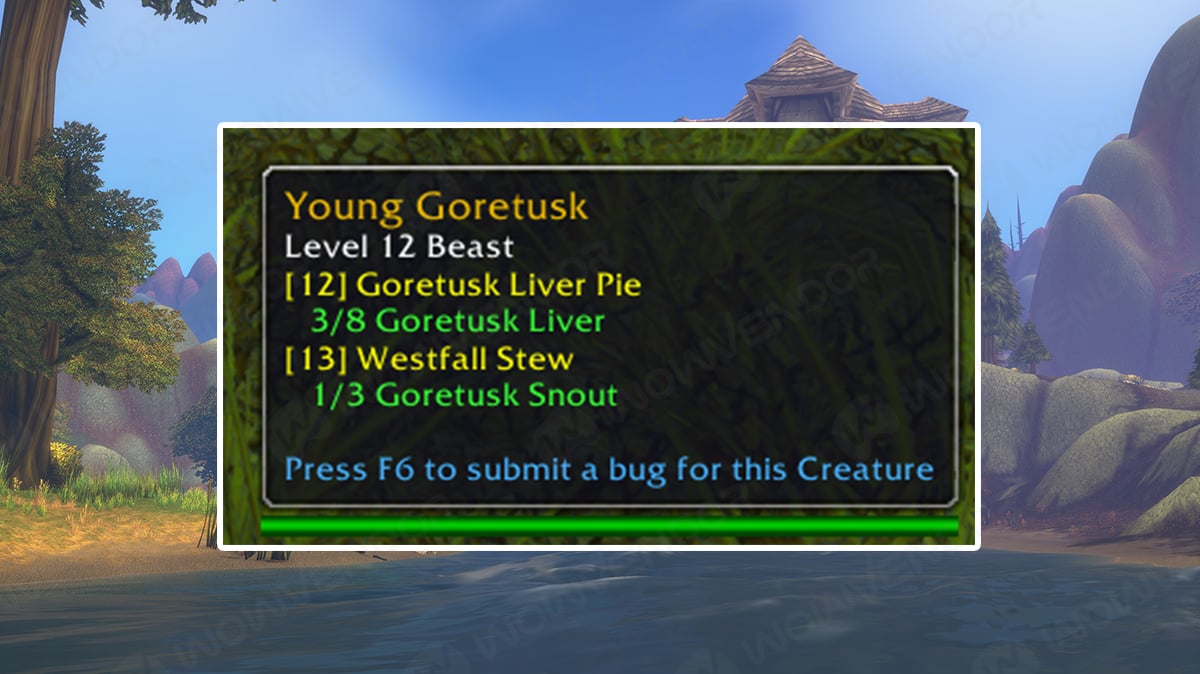
Questie remains one of the best WoW Forever addons for leveling. It displays quest objectives, available quests, NPC locations, and other useful information directly on your map and minimap.
This is particularly valuable in Forever because Blizzard is adding more than 1,000 new quests throughout its reimagined Azeroth. Finding every quest naturally is part of the Classic experience, but Questie can save a huge amount of time if efficiency matters more to you.
The main Questie project now lists Forever release version.
Note
Keep in mind that Forever contains completely new content. Quest databases may therefore remain incomplete until players discover and document new quests. Best for: Leveling and quest completion.
Leatrix Plus

Leatrix Plus is probably one of the easiest WoW Forever addons to recommend to almost everyone. Instead of changing one specific part of the game, it provides dozens of small quality-of-life improvements covering the interface, quests, chat, tooltips, sounds, minimap, and other systems.
The developer is actively publishing dedicated Forever builds, with updates continuing throughout the release. Its biggest advantage is convenience. Rather than installing several tiny addons for individual fixes, Leatrix Plus places many useful options inside one lightweight package. Best for: General QoL improvements.
Bagnon
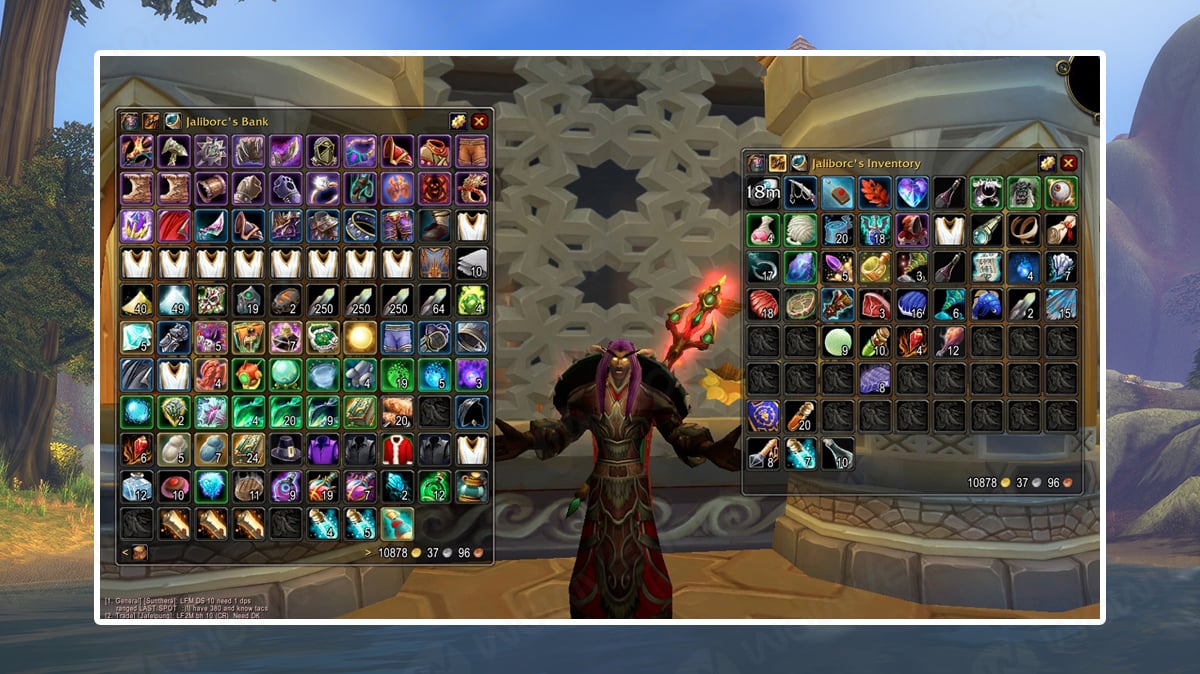
Classic-style inventory management can become messy very quickly, especially once professions, consumables, quest items, gear sets, and materials start filling your bags. Bagnon combines your bags into a single inventory window and adds searching, sorting, item counts, and other useful tools.
The addon currently includes an official WoW Forever flavor, so you do not need a separate community port. Forever keeps inventory management relatively close to Classic, making Bagnon especially useful while leveling and gathering profession materials. Best for: Bags and inventory management.
Auctionator
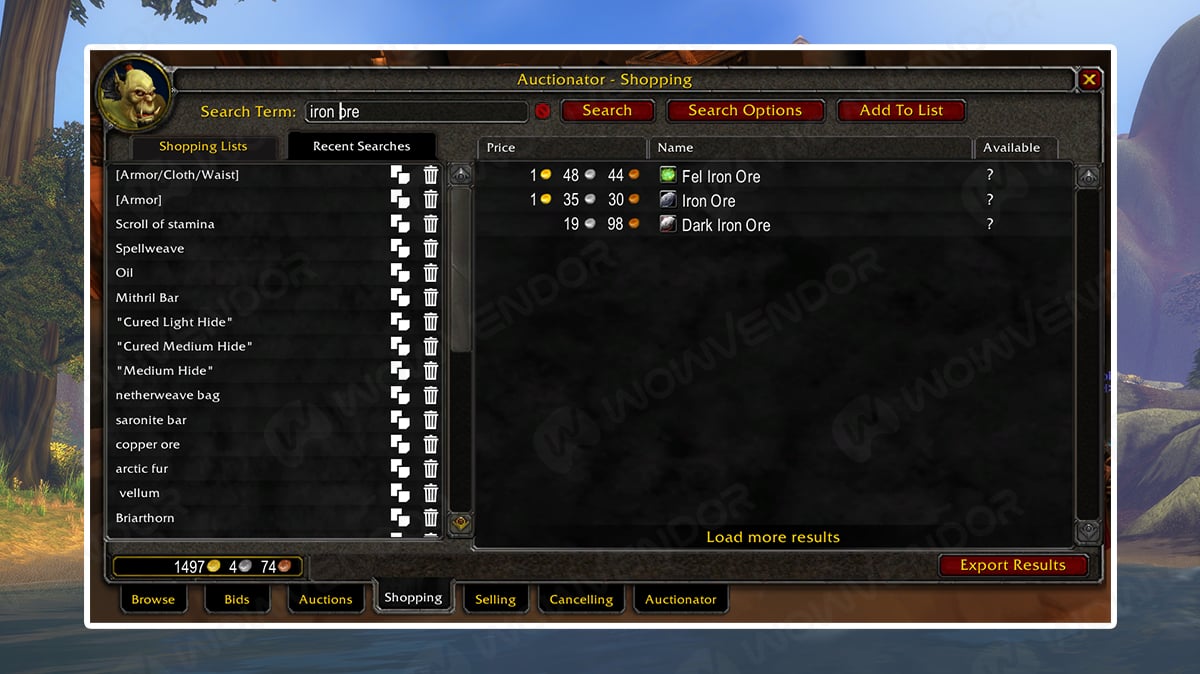
If you plan to use professions or make gold, Auctionator is one of the best WoW Forever addons to install. It improves the Auction House with easier buying and selling, better pricing information, searches, and item value tracking. Auctionator’s developers added Forever support immediately after Beta began and have already released several fixes specifically addressing Forever pricing, auction durations, and reagent bag support.
This should become increasingly useful once Forever’s economy develops and players begin trading new materials, recipes, and gear. Best for: Auction House and gold making.
TomTom

TomTom provides one of WoW’s most recognizable navigation tools. It allows you to:
- Create custom waypoints
- View coordinates
- Paste multiple waypoints
- Place pins through the world map
- Use an arrow pointing toward your destination
- Track your corpse location
The current TomTom release officially supports the Forever flavor alongside Retail and other Classic versions. TomTom becomes particularly useful when following guides that provide /way coordinates for quests, rare enemies, profession trainers, or hidden locations. Best for: Coordinates and navigation.
Leatrix Maps

If you want more control over the world map without installing a heavy interface replacement, Leatrix Maps is a great option. It improves the map with additional customization and useful exploration features while remaining lightweight. Just like Leatrix Plus, the addon has dedicated WoW Forever 1.60.1 releases.
Combining Leatrix Maps with TomTom gives you a strong navigation setup without dramatically changing the appearance of the original interface. Best for: Map customization and exploration.
AtlasLoot Classic Forever
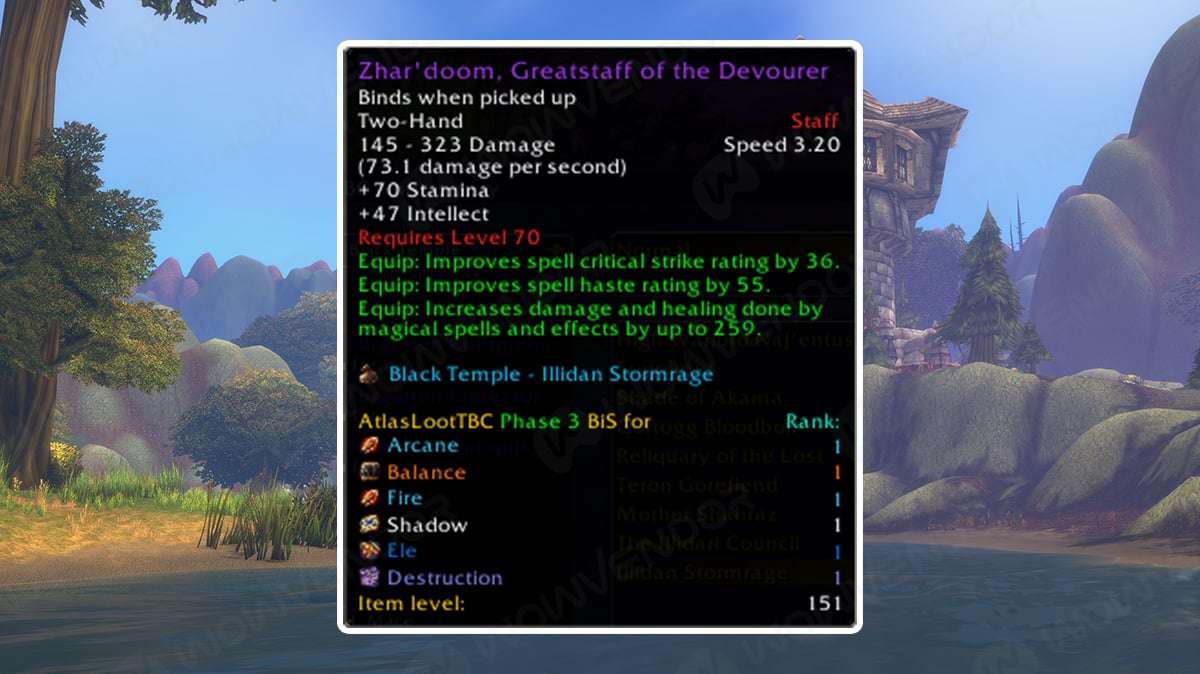
AtlasLoot Classic Forever lets you browse dungeon, raid, profession, and other loot information without leaving the game. A dedicated Forever version supporting 1.60.1 is already available. This should be particularly useful once players begin farming Forever’s nine new dungeons and its new endgame raids.
There is one important limitation, however. Blizzard is deliberately hiding some new Forever item information until those items are actually discovered on a server. That means loot databases can initially be incomplete, especially when new raids open. Best for: Loot tables and item research.
RareScanner
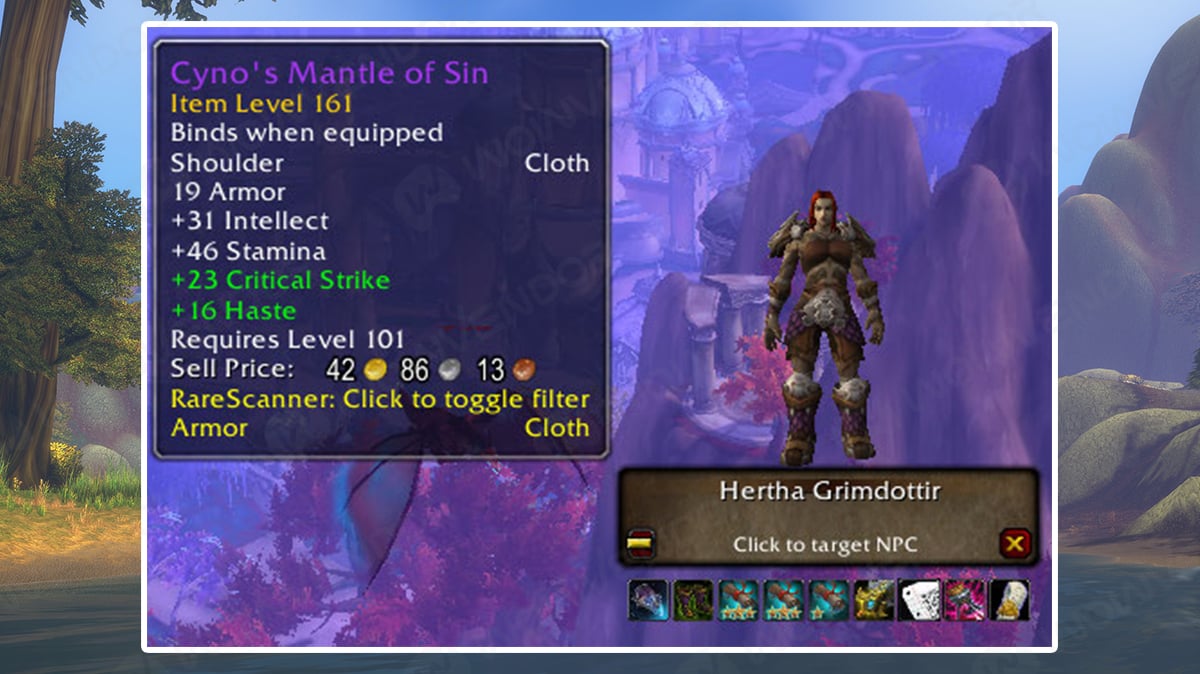
Forever dramatically expands Azeroth, making exploration addons much more useful than they might initially appear. RareScanner helps players locate rare enemies, treasures, events, and other points of interest.
A dedicated Forever 1.60.1 version is currently available, although it remains under active development. Because many Forever zones and enemies are completely new, expect its database to grow throughout the launch. Best for: Rare enemies, treasures, and exploration.
Prat 3.0
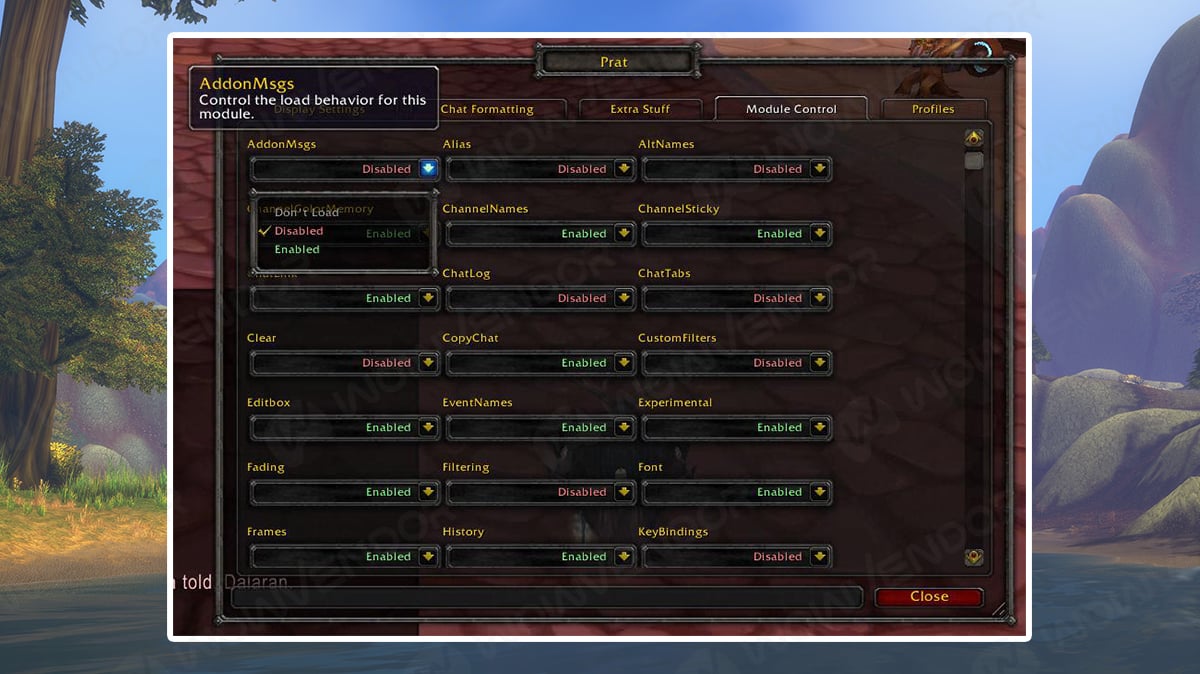
Prat 3.0 is a long-running chat addon that provides extensive customization for World of Warcraft’s chat window. Features include improved message formatting, filtering, player links, timestamps, chat history, and many other small communication improvements.
Forever is heavily focused on player interaction and community, making a better chat interface surprisingly useful. Prat added official Forever 1.60.1 support shortly after Beta launched. Best used for: Chat and communication.
HandyNotes: WoW Forever

HandyNotes: WoW Forever is another useful exploration addon, especially if you want help finding new Forever-specific rares and points of interest. The addon is built specifically for the Forever 1.60.1 client and currently adds map markers for new content, including rares on Zephras Isle. It works as a plugin for the main HandyNotes addon, so you’ll need both installed.
You can interact with its map pins to:
- View related achievements
- Set waypoints
- Link locations in chat
- Hide markers you no longer need
Because WoW Forever adds new zones, treasures, rares, and exploration content, this addon should become more useful as its database expands throughout live realm lifetime. Best for: Rares, exploration, and map completion.
Best WoW Forever Addons for Healers, Tanks, and Procs
Beyond everyday interface improvements, some addons focus on specific combat mechanics. These are particularly useful for players who want better control over their healing, threat generation, timings, or class resources.
ProcDoc

ProcDoc is a specialized addon that highlights important class ability procs through large, customizable visual alerts.
It supports various class mechanics, including Mage Clearcasting and Heating Up, Warlock Shadow Trance, Warrior Overpower, Rogue Riposte, and Shaman Maelstrom Weapon. Instead of constantly checking your buff icons, you can use ProcDoc to display prominent alerts when supported abilities become available or important effects activate.
The addon is especially useful for players learning more advanced rotations, where reacting quickly to a proc can improve damage output or resource efficiency.
ProcDoc works with WoW Forever’s built-in Cooldown Manager for supported tracked effects. However, some mid-combat procs cannot be detected reliably unless their information is exposed through Blizzard’s interface.
Best for: Proc tracking, class mechanics, and rotation optimization.
FiveSecondRule

FiveSecondRule helps players track the five-second Mana regeneration rule, an important mechanic for managing resources during longer encounters.
After spending Mana on a spell, Spirit-based Mana regeneration is reduced for a short period. FiveSecondRule displays a countdown showing how much time remains before normal regeneration can resume.
This information is particularly useful for healers who want to time their spells efficiently and conserve Mana during long encounters. It can also benefit leveling casters who want to reduce downtime between enemies. The addon supports different timer positions, including integration with the player Mana bar and Personal Resource Display.
Note
Unlike its Classic Era version, FiveSecondRule does not provide a traditional two-second Mana tick timer in WoW Forever. Its primary purpose here is tracking the five-second rule.
Best for: Mana management, healing efficiency, and five-second-rule tracking.
Forever: Threat
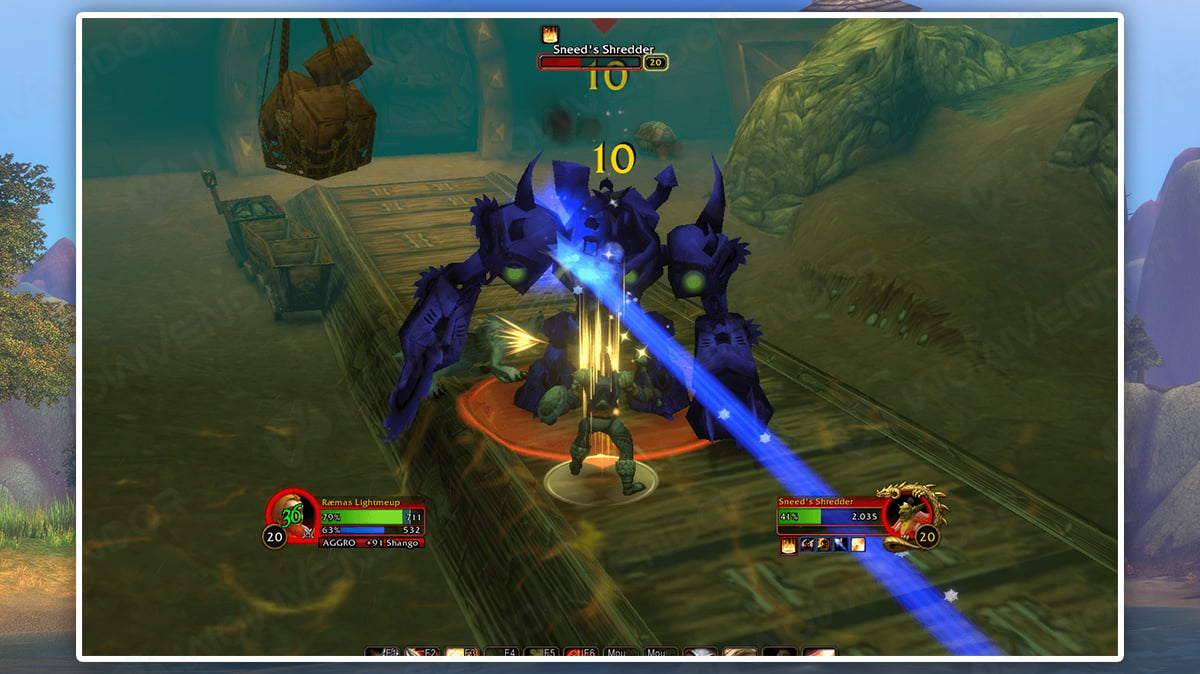
Forever: Threat (Plates & Bar) is designed to help tanks monitor enemy aggression and maintain control during combat. The addon provides a compact threat indicator and threat-colored enemy nameplates. Green indicates secure aggression, yellow warns when another player is approaching your threat level, and red indicates lost aggro.
This is especially useful during large dungeon pulls, where Protection Warriors, Protection Paladins, and Bear Druids must maintain control of multiple enemies simultaneously.
Forever: Threat also provides role-aware indicators for damage dealers and healers, helping them recognize when they are in danger of pulling enemies away from the tank. Exact numerical threat information may be limited by Forever’s combat API.
Best for: Tanking, threat management, and aggro tracking.
ClickMend
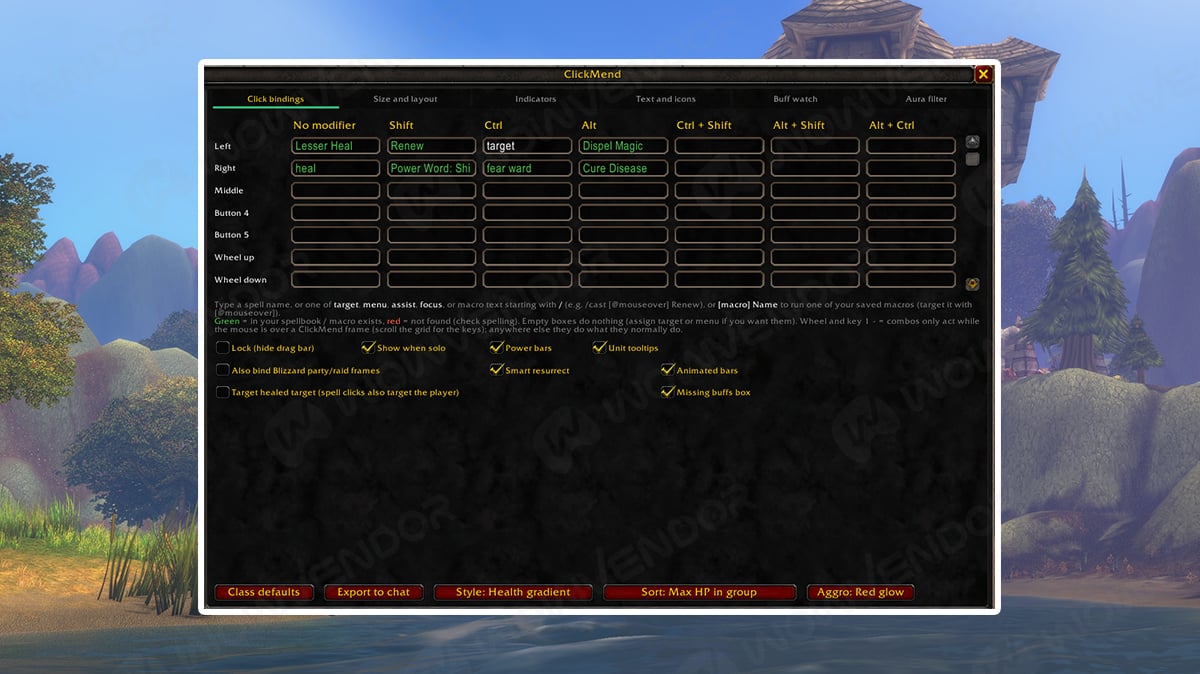
ClickMend is a dedicated healing addon designed for WoW Forever’s modern interface restrictions. It provides customizable party and raid frames with click-casting functionality, allowing healers to cast spells directly on group members without selecting them first.
You can assign different healing spells to mouse buttons, keyboard modifiers, and other supported inputs. ClickMend also displays useful information such as dispellable debuffs, incoming healing, absorbs, and player range.
The addon is particularly useful for Priests, Restoration Druids, Restoration Shamans, and Holy Paladins, basically every Healer in the game. Its customizable interface makes managing healing assignments and reacting to incoming damage easier during group encounters.
Best for: Healing, raid frames, and click-casting.
Deadly Boss Mods (DBM)

Deadly Boss Mods (DBM) is one of the most popular World of Warcraft addons for tracking boss mechanics and managing difficult encounters. It provides visual warnings, ability timers, and sound alerts to help players react to dangerous attacks and important fight mechanics.
DBM is particularly useful for tanks, healers, and DPS players who want clearer information during dungeon and raid encounters. Its customizable alerts can help identify upcoming abilities, interrupt opportunities, and mechanics that require immediate attention.
WoW Forever has a dedicated DBM release, alongside separate modules for dungeons and Classic raid encounters. However, support for the new Forever bosses is still being developed, so some encounters may not have complete ability timers or warnings yet.
Best for: Dungeon and raid mechanics, boss ability tracking, and encounter warnings.

Best WoW Forever addons by category
If you don’t want to install all 15 addons, here’s a quick comparison to help you choose the most useful ones.
|
Category |
Recommended Addon |
|---|---|
|
Questing and leveling |
Questie |
|
General quality of life |
Leatrix Plus |
|
Bags and inventory |
Bagnon |
|
Auction House and gold |
Auctionator |
|
Coordinates and navigation |
TomTom |
|
Map customization |
Leatrix Maps |
|
Dungeon and raid loot |
AtlasLoot Classic Forever |
|
Dungeon and raid mechanics |
Deadly Boss Mods (DBM) |
|
Rare enemies and treasures |
RareScanner |
|
Chat customization |
Prat 3.0 |
|
Forever-specific exploration |
HandyNotes: WoW Forever |
|
Healing and raid frames |
ClickMend |
|
Tanking and threat tracking |
Forever: Threat |
|
Mana regeneration |
FiveSecondRule |
|
Ability proc tracking |
ProcDoc |
For most players, combining Questie, Leatrix Plus, Bagnon, and TomTom provides a strong starting setup without making the interface unnecessarily complicated. Healers and tanks can add their specialized addons when preparing for dungeon or raid content.non + TomTom already covers a large portion of everyday quality-of-life needs.
WoW Forever banned addons
Forever handles combat addons differently from older Classic versions. Blizzard confirmed that Forever follows the modern WoW addon API approach, including restrictions intended to prevent addons from performing complex combat calculations or becoming mandatory for encounters.
That means you should not expect every traditional Classic combat addon to work exactly as it did before. Forever also includes a built-in damage meter, reducing the need for Details! simply to track basic performance. Blizzard is also working on additional native interface tools such as its Cooldown Manager.
One notable example is WeakAuras, which does not currently offer an official Forever version. Community alternatives exist, but they are still subject to Forever’s combat restrictions. Blizzard also provides several built-in tools that reduce the need for certain addons:
- Cooldown Manager: Tracks important ability cooldowns through the game’s interface.
- Damage Meter: Displays combat performance information without requiring a separate damage-meter addon.
- Edit Mode: Allows players to customize and reposition supported interface elements.
- Swing Timer: Provides basic weapon attack timing without installing another addon.
How to install addons in WoW Forever

Installing WoW Forever addons is straightforward, but you must use the correct game version. Forever has its own client and addon directory, separate from Retail and Classic Era. You can install addons automatically through CurseForge or manually by downloading their files.
Installing addons with CurseForge
The easiest method is using the CurseForge desktop application.
- Open CurseForge and select World of Warcraft.
- Choose WoW Forever as your game version or installation.
- Search for the addon you want to install.
- Select its Forever-compatible release and click Install.
- Launch or restart WoW Forever and check the AddOns menu.
CurseForge can also help keep your addons updated as developers release compatibility fixes.
Always confirm that you’re managing the Forever installation rather than the Retail or Classic client.
Installing WoW Forever addons manually
If you prefer not to use an addon manager, you can install addons manually.
- First, download the Forever-compatible ZIP file from CurseForge or the developer’s official project page.
- Extract the addon folder into the following directory:
World of Warcraft\_forever_\Interface\AddOnsFor a default Windows installation, this is usually:
C:\Program Files (x86)\World of Warcraft\_forever_\Interface\AddOnsMake sure the extracted addon folder contains its .toc file directly inside it. Avoid accidentally creating additional nested folders.
Restart WoW Forever after installing the files. Your addons should then appear in the AddOns menu.
How to fix WoW Forever addons not working
If an addon doesn’t load or causes errors, check the following:
- Wrong game version: Download a release specifically marked for WoW Forever 1.60.1.
- Incorrect folder: Make sure the files are located inside
_forever_\Interface\AddOns, not_retail_or_classic_era_. - Outdated addon: Check CurseForge for a newer version. Forever uses interface version 16001.
- Missing dependencies: Some plugins require additional addons, such as HandyNotes: WoW Forever requiring the original HandyNotes.
- Conflicting addons: Disable your addons and re-enable them one at a time to identify the source of errors.
The Load out of date AddOns option may allow some older files to load, but it does not guarantee compatibility. Installing an updated Forever version is generally the safer approach.

And that wraps up our top 10 best addons for WoW Forever! The right addons can make everything from leveling to raiding more convenient, but if you want to save even more time on your adventures, a WoW Forever boost can help you skip the repetitive grind and focus on the content you enjoy most.
WoW Forever Addons FAQ
Do Classic addons work in WoW Forever?
Classic Era addons are not automatically compatible with WoW Forever. The game uses a different client and interface version, so you should download a dedicated Forever release whenever one is available.
How do I install addons in WoW Forever?
You can install addons using CurseForge by selecting WoW Forever as the game version. Alternatively, download the addon files manually and place them in the Forever AddOns folder.
Where is the WoW Forever addon folder?
The addon directory is World of Warcraft\_forever_\Interface\AddOns. It is separate from the Retail and Classic Era addon folders.
Does WeakAuras work in WoW Forever?
The original WeakAuras addon does not currently have an official WoW Forever release. Players can use Blizzard’s built-in Cooldown Manager or explore community alternatives designed for Forever’s restricted combat API.
Why are my WoW Forever addons not working?
The most common causes include installing the wrong addon version, placing files in the incorrect directory, missing dependencies, or using outdated releases. Updating the addons and checking their installation folders usually resolves these issues.
Does Deadly Boss Mods work in WoW Forever?
Yes, DBM has an official WoW Forever version, including separate dungeon and raid modules. It provides encounter warnings and boss ability tracking, although some newly introduced Forever encounters may not have complete mechanic support yet.






Comments
PENTEST WVXSS566501